WidgetBucks - Trend Watch - WidgetBucks.com
Tuesday, November 27, 2007
by Jason
Believe it or not Google china can find many software easier than ordinary search. Seeing is believing. Let's try now.
- Go to http://www.google.com/intl/zh-cn/
- Type the name of the program you want followed by cracked download (for example : Office 2007 cracked download)
- Then click the third button.
- All the results will be in Chinese. Just click randomly and you can download the software you want with no waiting time and no download limit.
I'm not sure downloading from Chinese site will be faster than your favourite download sites. So if this not work for you, just stick to the method whatever you used to. I'm not responsible for any of your action. This is just a tip.
Posted in:
Google,
Internet,
Tips,
Tricks
|
|
|
Tuesday, November 06, 2007
by Anonymous
You love some blog post on blogger platform and you've just commented it, but what if you forgot the url of that blog? You should subscribe to the comments of that post to receive followups from other users or the blog authors.
Now blogger.com have just introduced this very useful feature. They announced it on
blogger buzz.

Even though I love this feature, I'm still eagerly waiting for Google to introduce us to be able to schedule blog posts, just like many of wordpress users normally do.
Posted in:
Google,
Innovative,
My Experience,
Tech News
|
|
|
Wednesday, October 31, 2007
by Jason
We all know that Google become word in famous dictionaries like Merriam-Webster and the Oxford. But do we really know how to use "Google" as noun, verb?
This is the definition of Google from Merriam-Webster dictionary.
to use the Google search engine to obtain information about (as a person) on the World Wide Web
Normally, we think Google means searching the internet, but the correct meaning is searching the internet by using Google search engine. So, obviously the following sentence is wrong.
I googled her on Yahoo and she seems pretty interesting.
You can't google on Yahoo!. You can google only on Google search engine. So that if you have to use Yahoo! or MSN or whatever alternative search engine, you'd better use the term "search" instead of "google".
Anyway, this is for your information. If you use the wrong word, you can get embarrassed in front of crowds or even worse you can get sue as Google is the brand to protect. Knowledge is gold. Knowing the correct usage can't give you any trouble at all.
Reference :
Google Blog
Posted in:
Google,
Misc
|
|
|
May be I'm pretty late to blog about this. But you know what? I've got IMAP access in my Gmail. See the picture below:

According to
Gmail blog announcement of IMAP, they've started rolling out this feature since 24-Oct. But I've got the news late and when I check it out, it's already there.
So now you can access Gmail using POP client, or IMAP for free. Now I'm wondering who would pay $19.99 per year for Yahoo! Mail Plus.
Posted in:
Google,
Online Services,
Yahoo
|
|
|
Monday, October 29, 2007
by Jason
Long long ago, based on the counter speed of Gmail page, I wrote
an article that Gmail will reach 3 GB in 2008.
But recently,
Google increased the speed of the counter and now Gmail has got over 4GB already. Some people even suggest that Gmail will reach 6GB at January 2008. If you're using
Google Apps like me, they've adjusted the storage boost for our custom email addresses too. If you're Premier Edition users, now you will get a mighty 25 GB space instead of 10 GB.
Some of you might say that Yahoo! have already offered unlimited storage for their email. Are you aware that Yahoo! not only they reserve the right to delete MISUSED accounts but also limit their attachment size at 10MB (Gmail now allow 20MB).
We all love Google, don't we?
Posted in:
Google,
Internet,
Online Services,
Tech News
|
|
|
Sunday, October 28, 2007
by Anonymous
Many new bloggers are now enjoying the green indicators of Google PR. Obviously, Google updates many new sites yesterday. I've got PR 3!!!!

So that Bridge to Nova is no longer a newbie in the world wide web anymore. We are grown-up now. You may have read that many pro bloggers are talking about you shouldn't care PR. But I'll tell you that you really really should. At least, it is a pride and my bragging right. Trust me, all those probloggers would blog and brag about their PR if they've got +1 or +2 increases. Cashquests have got a great article
why you should care about PR. Have a nice weekend all.
Excuse me, I'm going to open champagne now.

Posted in:
BtN related,
Google,
My Experience
|
|
|
Monday, October 22, 2007
by Anonymous
I'm always wondered why Yahoo! can't defeat Google yet? I know that Yahoo! acquire many many companies and tried to be in front of Google in the search war.
But except simple search terms, Yahoo! search results are far far behind Google. Yahoo! results usually look spammy and irrelevant. Anyone with one week experience of both search engines can tell you that Google is a clear winner.
Why? why?
Well, the answer actually lies within Yahoo! itself. After you've built a new website, if you want your site to get indexed by Google, everyone can submit for free. Even though Google have adwords program with sponsored search results, Google clearly states that no one can buy search results.
For Yahoo!, even though there are free search submission available, they also accept paid submission. For Yahoo! free submission, it took ages for your site to come up.
There are two types of paid submission for search results.
For Yahoo! Search submit basic
When you initiate your Search Submit Basic subscription, a nonrefundable annual fee of $49 per URL is charged. This annual fee also includes account setup and a basic quality review of your pages. You can submit a maximum of 5 URLs per domain into the program.*
For Yahoo! Search Submit Pro
Pricing is based on cost per click - customers are charged each time a user clicks on one of the customer's search listings. The specific cost is based on the type and category of content provided for inclusion in the algorithmic search results.
See? Despite having Sponsored search results program like Google, Yahoo! also have paid submission to include in their search results. So Yahoo! search results are clearly biased.
My advice is that you shouldn't rely on Yahoo! as long as they have their biased programs, their search results will be their sponsored less relevant webpage presented to you to increase Yahoo! revenue rather than the best relevant results to your keywords.
Posted in:
Google,
Opinions,
Yahoo
|
|
|
Friday, October 05, 2007
by Jason
After I have used feedburner for my feeds, I have setup feed redirect in the Settings -->> Site feed as follow.
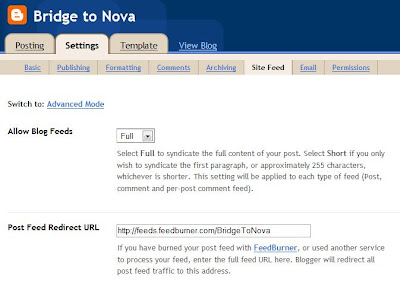
After two or three days, when I login to my Google Webmaster account, I have got the following warnings in my sitemap error.

When I click to view the warnings in details, I saw this:
Line: 2 Invalid XML: too many tags - Too many tags describing this tag.
Line: 2 Incorrect namespace - Your Sitemap or Sitemap index file doesn't properly declare the namespace.
It made me very frustrated. Feedburner isn't compatible with Google's Blogger services? After talking with my geek friends and emailing to Google, I have got the following solution.
- 1. I have to delete the old sitemap.
- 2. After that, I add new sitemap with ?redirect=false
That's it! Since then, I can see my sitemap with errors or warnings free as below.

Posted in:
Google,
My Experience,
Online Services,
Tips,
Tricks
|
|
|
Wednesday, October 03, 2007
by Jason
Well, I don't use adsense here. So I don't have to scare of one day getting email about I'm getting banned due to fraudulent click. But for one of my friend, who depends on Google adsense, it's life and death situation.
One day, he accidentally click one of adsense and send email to customer support informing about the accident. (Yeah! he's that honest) After two days of nightmare, he got the following reply from Google.
Thanks for letting us know about the clicks on your ads. We appreciate your honesty and your efforts to keep your account in good standing.
Although publishers are not permitted to click on their own ads for any reason, we do understand that accidental clicks may occur, so we don't require that you contact us every time you click on your ads.
If you were clicking your ads out of interest or to see who was advertising on your site, we suggest the AdSense preview tool as an alternative. This tool will allow you to check the destination of ads on your page without the risk of generating invalid clicks.
Because we closely monitor all account activity using engineering systems and thorough human analysis, chances are we've already detected your clicks on your ads and discounted them. While these clicks still show in your reports, we filter out their associated earnings so that advertisers aren't charged.
Whew!! He can relax now. So I just want you guys you know that if you accidentally click one of your adsense ads, don't panic. It's not the end of the world.
Posted in:
Google,
My Experience,
Tips
|
|
|
Thursday, September 27, 2007
by Jason

I have been wondering when Google will celebrate 9th birthday since the beginning of this month. But today, as in their homepage Google officially celebrate now.
Why Google birthday is varying from year to year?
In September 1998, Google Inc. opened its door in Menlo Park, California. The door came with a remote control, as it was attached to the garage of a friend who sublet space to the new corporation's staff of three. The office offered several big advantages, including a washer and dryer and a hot tub. It also provided a parking space for the first employee hired by the new company: Craig Silverstein, now Google's director of technology.
Already Google.com, still in beta, was answering 10,000 search queries each day. The press began to take notice of the upstart website with the relevant search results, and articles extolling Google appeared in USA TODAY and Le Monde. That December, PC Magazine named Google one of its Top 100 Web Sites and Search Engines for 1998. Google was moving up in the world.
The exact date they celebrate their birthday will depend on their people appetizes for birthday cake. (See my previous post about
When Google Birthday for details)
Well, anyway, Happy Birthday Google!
Posted in:
Google,
Internet
|
|
|
Wednesday, September 12, 2007
by Jason
I know internet search become one of daily routines in our life. All people use major four search engines such as Google, Yahoo, MSN (Windows Live) and Ask. Actually, most people search internet in that order. First they try Google, after that Yahoo, after that MSN (Windows Live) and then Ask. We all know that Google is the king of the king in search engines market. But wouldn't it be nice your search terms to search simultaneously on all four major search engines.
You should try
Dogpile. It will search your keywords in all four and then return you with results and even where that result come from.
For examples, my search for bridge to nova returns at No. 9 and only from Google (Yeah, that's why I said they are the king).

You should try it too. It's really fun to see which one return what. By the way, if you wanna know more about Google search, don't forget to check out my
Google search tips article.
Posted in:
Google,
Innovative,
Internet
|
|
|
Wednesday, September 05, 2007
by Striker

Have you ever wonder when is Google birthday? It's somewhere around in September. Here is the
official explanation.
Google opened its doors in September 1998. The exact date when we celebrate our birthday has moved around over the years, depending on when people feel like having cake.
While we are waiting for Google celebration of their 9th birthday, you can enjoy
Google Corporation history. It's really interesting.
Posted in:
Google,
Internet
|
|
|
In case if you still don't know, this tip could make you WOW! Did you know that Google search box can also use as a calculator? For example, if you type 3+2 in the search box, it will give you the result 5.
There are many functions Google calculator can do. Starting from simple function such as addition, subtraction, multiplication, division to advanced calculation such as square root, sin, cos, etc.

See? That function is definitely complex. That calculator can handle it on the fly. Even more, you can use it as a converter too. For example, if you type 4 miles in kilometer, it will give result as follow.

If you are very curious to know all the functions you can do with the calculator, you can check here. (
link) You don't have to carry your calculator all the time with you as long as you've got internet access. Nice, huh?
Posted in:
Google,
Innovative,
Tips
|
|
|
Monday, September 03, 2007
by Jason
Last month, I have told you guys about
Google Earth closeup photos. But there are many things Google Earth can do. You can even use as a flight simulator. Yeah! that's hidden feature (or easter egg, you named it) in latest version of Google Earth.
First start the program, then you can press Ctrl+Alt+A and then you'll see the flight simulator screen. You can choose two planes. For a place, you can choose Google's given airports or you can start anywhere on planet.
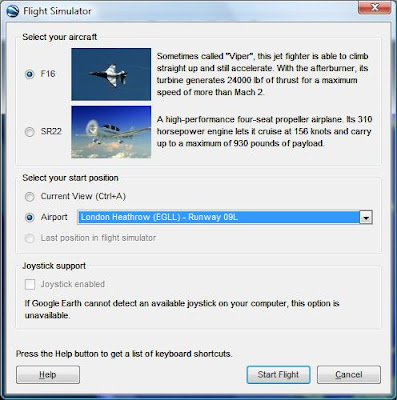
You can press Ctrl+H for the list of commands or you can check
here.
Enjoy your flight!
BtoN's Tips: If you can't start flight simulator by using Ctrl+Alt+A, you can try Tools-->> Option -->> General tab --->> Check Send usage statistics to Google. If still doesn't work, you can add new registry dword value in HKEY_CURRENT_USER\Software\Google\Google Earth Plus\FlightSim
New DWORD value and then IsEnabled. Set the value to 1.
Congrats go to
Marco for this great discovery.
Posted in:
Easter Eggs,
Google,
Innovative,
Tips
|
|
|
Sunday, September 02, 2007
by Jason
Since I restarted my blogging, I am looking for
Google Page Rank update. But now, Google must be doing really big to crack link baiting scam. That's a good thing actually as many people are taking advantages of a number assigned by Google almost every 3 months.

According to
SEOlogs, this is the longest pagerank update in history. I can't wait to see when Google will update.
Come on Google! We know you are busy and we all are waiting.
Posted in:
Google,
Opinions
|
|
|
Tuesday, August 28, 2007
by Jason
Here is my compilation of all the Google search tips everyone should know about.
Search within a range : You can search in Google within a desired range. You need to type in the range as separated by “..” but make sure you specify the unit as well.
For example: LCD 21..32 inches
Synonym Search with "~"(Tilde) sign : If in case you want to search for the term as well as it’s synonym, then just add the “~” sign in front of your search term, you will see the links for the same terms synonym.
For example: ~fun~image would return fun image as well as joke image, humor image, joke pic, etc.
Omit certain word with "-"(minus) sign : If you want to omit certain word, you can add the "-" sign in front of your search term.
For example: if you search bill microsoft, you'll get all the results relating to Bill Gates and Microsoft, but if you search bill -gate microsoft, you'll get the real bill about microsoft.
Definition search : You can use "define:" to search definition of a word.
For example: if you search define:lcd, you will get definition of lcd all over the net, it's more complete than Answers or Wiki.
Use of "?"(question mark) sign : If you are uncertain about the spelling of the word or you want all possible words, you can use the "?" sign.
For example: if you search sun?day, you can get results such as sun earth day, or the word sun-day.
Use of "*"(asterisk) sign : Not sure about how it's different with "?" sign. But you can try the example and you'll understand.
For example: if you search friend*, you will get words like friends, friend to friend, friend society. Compare the result with ordinary friend search, you'll know how to use "*"
Search for exact phrase with quotation mark "": If you want Google to search all the words you type, use quotation marks. This feature is available in Advance search feature too.
For example: if you search "just like that" with quotation, you will get results containing exact phrase "just like that"
These tips are worth knowing and you should try all of them, they'll be useful for you one way or another. As Google is always tweaking their search engine and algorithm, I'm sure there'll be more interesting tips always.
Posted in:
Google,
Internet,
My Experience,
Tips,
Tricks
|
|
|
Monday, August 27, 2007
by Jason
Google Earth is now not limited to Earth only. It could let you explore the space also. Starting from version 4.2, Google added sky feature in the famous Google Earth program. It depends on location. So that when you are at New York and click sky button, the sky you see will be different if you click when you are at Africa.

You should
download this new version and feel the different.
Reference :
Google
Posted in:
Google,
Innovative,
Programs,
Tech News
|
|
|
Friday, August 24, 2007
by Striker
After searching for infos about Gtalk, here are the things you should know about Gtalk apart from running
Multiple Gtalk.
Trivia
1. Buddy - You don’t have to say YES or NO when someone adds you. Simply ignore it and the request will go away. (On the other hand, someone with whom you chat often will automatically turn to be your friend, unless you disable this in the options).
2. Conversation - A message can be 32767 characters long.
3. Display Name - You can change your Gtalk chat name in Account Page
4. Active link - Adding a web URL in custom message will result it to be clickable.
Un-trivia
1. Wumpus Game - Wumpus is an easter egg game that came with Google Talk. If you add new contact wumpus.game@gmail.com, you can play the classic text-based game.
2. Bold Text - To write something bold, you can use an asterisk before and after the word, like *this* .
3. Italic Text - To use italics, use an underscore before and after the word, like _this_ .
4. Switch windows - Hitting tab will cycle through open windows. It will select minimized conversations, to expand them just hit enter. If you just want to cycle through IM's and don't care about the buddy list, control-tab will do that and will automatically expand a minimized conversation if you settle on one.
Fun BeginsBelow is the list of Gtalk emoticons you can use. (
From Google)
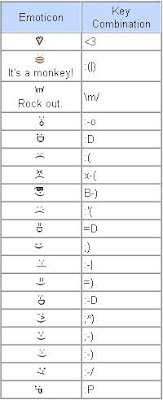
Special thanks to my lovely Jennifer for this tips!

Posted in:
Google,
Internet,
Tips,
Tricks
|
|
|
Monday, August 13, 2007
by Jason
This is the coolest trick I've ever got for Google.
You can use
Google Image search to search only faces of people. Did you know that already? If not yet, try these:
- Ordinary Image Search for Microsoft
- Faces Image Search for Microsoft
This picture is faces search for keyword, "Microsoft", on Google Images.

You need to add the following line after the image search queries to use face search.
&imgtype=face
Your address bar should look like below:

If you don't want to use manually typing, you can select from Google Advance Image Search option as in the following picture.

How could this be useful? Well, if you are looking for images of the people behind popular companies, products or even countries, this tool will be very handy indeed.
Updated: I just figured out that Windows live also just introduces faces search at July 27. (See their official blog). Thanks garyprice for the info.To use new feature in Windows Live image search, try these:
1.without the new features – jimi hendrix
2.with new face filtering on – jimi hendrix filter:face
3.with new portrait filtering on – jimi hendrix filter:portrait
4.with new black and white filtering on – jimi hendrix filter:bw
 Currently, this Window Live feature is only available by adding the following filter after the image search queries,
filter:face, filter:portrait, or filter:bw. Microsoft may make these features accessible through a drop-down menu or maybe radio button (just like Google) soon.Microsoft has also provide you Related People feature on the right side of the screen. Try it! You will be amazed by the new technology of the world's two giants companies.
Reference :
Blogoscoped,
Live Search Official blogSpecial thanks to all commentators for helpful infos.
Posted in:
Google,
Innovative,
Internet,
Microsoft,
Tips,
Tricks
|
|
|
Since I've bought bridgetonova.com domain, I haven't setup up any email addresses yet. Of course, my domain registrar provide Forward Email for free of charge, but I want POP3 access. So I am shopping for email services.
Yahoo! provide
these email services.

But when I checked for Gmail, it's free! (
Link) Not only Google provide this services for free, but also far more better than Yahoo! Services.

While Yahoo! provide only 1 or 10 email addresses for either $34.95/year or $9.95/mo, Google provide 100 email addresses for free. Yes! that's right 100 email addresses for your domain.
Without any hesitation, I've already signed up with Google. Now you can contact me at jason at mydomain name.
I'm really wondered is there anyone who would buy Yahoo! email services.

Posted in:
Google,
Internet,
My Experience,
Opinions,
Yahoo
|
|
|



